


All eight static checks passed. I put the robot dog in the middle of the living room and gave it its first command: walk forward 0.3 meters.
It veered off and ran straight into the furniture next to it.
That was PawAI in its eighth month. PawAI is the interactive robot dog I built on a Unitree Go2: an NVIDIA Jetson on its back, a RealSense depth camera in front, plus a lidar, a speaker and a full stack of face, voice, gesture and pose recognition. It went on to win first place in our department’s capstone presentations and was demonstrated live at National Taiwan University. It could understand you, greet you and perform actions.
But one thing it never did reliably, from start to finish: move.
This is not a showcase. It is a retrospective backed by data. I have grouped the difficulties of these eight months into hardware, sensors, navigation, voice interaction and testing: what the symptom was, what we measured, what the real cause turned out to be, and whether it got solved. It is long; use the table of contents to jump around.
The eight months in just over a minute. Illustrations are AI-generated (Codex); the narration is an AI voice (Gemini TTS).
Testing on a real robot is nothing like web development
Testing comes first, because it shaped almost everything else.
I started out writing websites. When a web page breaks, you change a line, save, refresh, and know the result in two seconds; if a test breaks something, you just run it again. A robot dog is nothing like that:
| Web development | Real robot dog | |
|---|---|---|
| Time per test | Save and refresh, seconds | Boot, connect, check battery, carry the dog back to the start: minutes every time |
| Test environment | Identical every time | Light, floor, furniture, battery and temperature change every time |
| When a test goes wrong | Refresh | The dog may hit a wall or fall; check it for damage first |
| Tests in parallel | Open more tabs | One dog, one room |
| Who runs it | Automated tests | Me alone: emergency stop in one hand, eyes on the screen, standing next to the dog |
What actually filled the days were small, relentless chores:
- Reset the dog every time: tape marks the start point on the floor. Before each test, I carried the 12 kg dog back to the same spot and heading, put the obstacle back in the same place, and measured distances from the nose with a tape measure. Without that, two runs could not be compared.
- Check the battery every time: below half charge I did not test, because low voltage caused brownouts that invalidated everything. Once, a ten-round collision test ran out of battery in the first round.
- The small room magnified lidar errors: a wall or furniture sat about 1.1 m ahead of the dog, so the safety layer refused to move and I had to tune a separate set of narrow-space parameters. In that little space, a small lidar angle error meant the difference between stopping and hitting something.
- One person testing every feature: face, voice, gesture, pose, movement. I stood in front of the camera, spoke the commands and made the gestures myself. “A stranger” or “two people at once” could not be tested at all, so those were skipped.
- Any problem meant retesting everything: once I changed a parameter without rebuilding and spent three hours testing old code. I made the same mistake again later and lost another five hours. Each time, the whole round started over.
How small was the room? Here it is, reconstructed from photos and measurements:
3D model of the test space; furniture is approximate. Light green is the whole walkable L-shaped floor, dark green is the main test area of about 2.5 × 1.5 m, and the light blue circle is the lidar's 1.2 m radius. It is about 2.5 m wide at the desk end, narrows to a 0.9 m aisle between desks, a printer and a cart toward the door, and is about 6 m long.
In a space like this, a navigation algorithm has almost no room to go around anything. That is why so many of the problems below happened at the scale of “0.3 meters” or “20 centimeters”.
Hardware: getting a dog to carry a computer
The stock Go2 walks, runs and gets itself up, but it does not recognize people, listen to you or decide what to do. PawAI’s job was to give it a “brain” and a set of “senses”. That sounds like just bolting things on; in practice, nearly every part had its own problem.
The final layout

From head to tail, PawAI carries:
- Depth camera (Intel RealSense D435) on the forehead, for people, objects and obstacles at its feet.
- 2D lidar (RPLIDAR A2) on a 3D-printed mount, for scanning and mapping.
- USB speaker, so the dog can talk.
- Compute box (NVIDIA Jetson Orin Nano Super 8GB), where all recognition, decisions and control run.
- Step-down converter at the back, turning the Go2 battery voltage into something the Jetson can use.
The Jetson and the Go2 are connected directly by an Ethernet cable. Speech recognition and the language model were too heavy and run on a remote GPU.
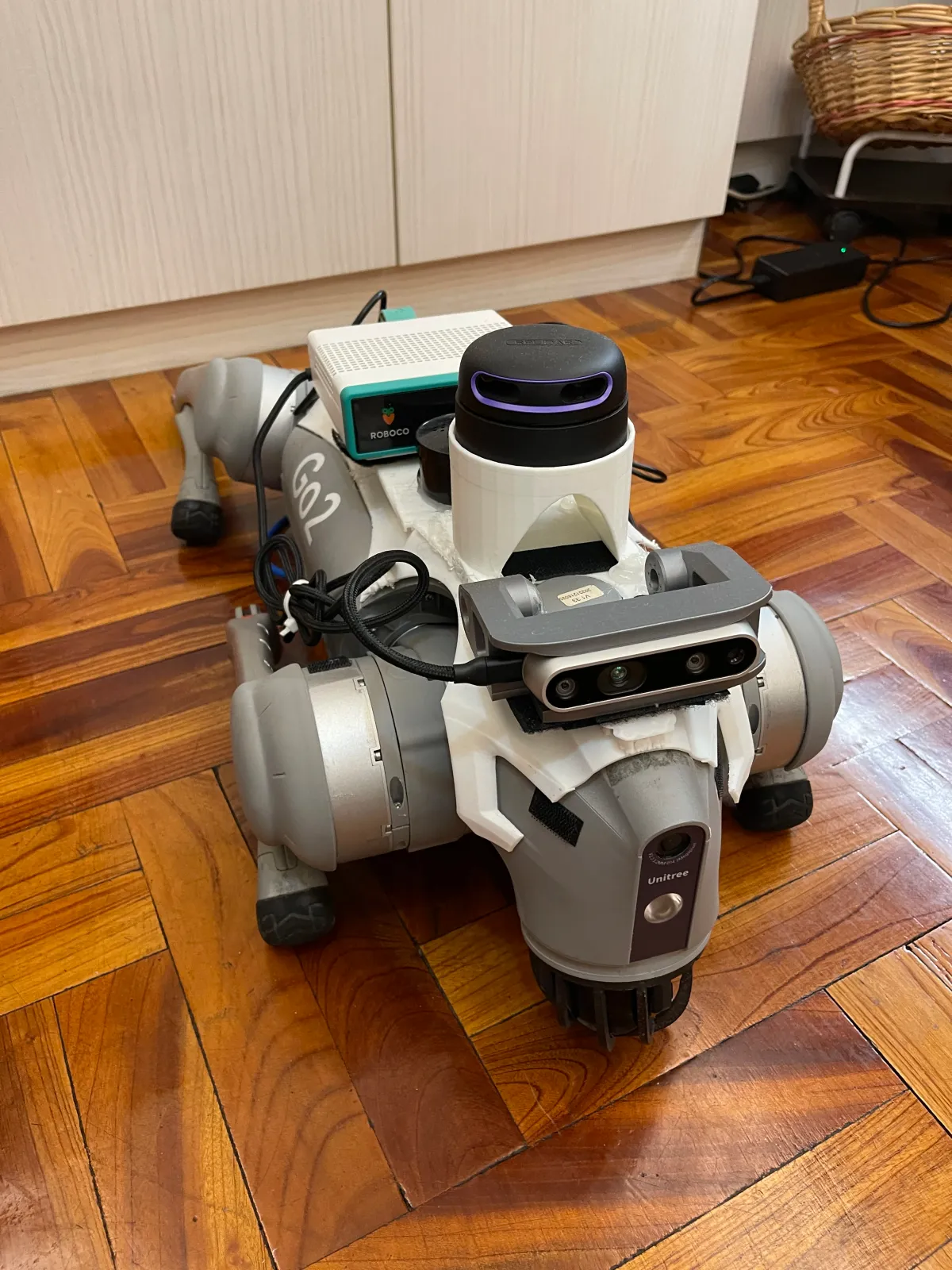
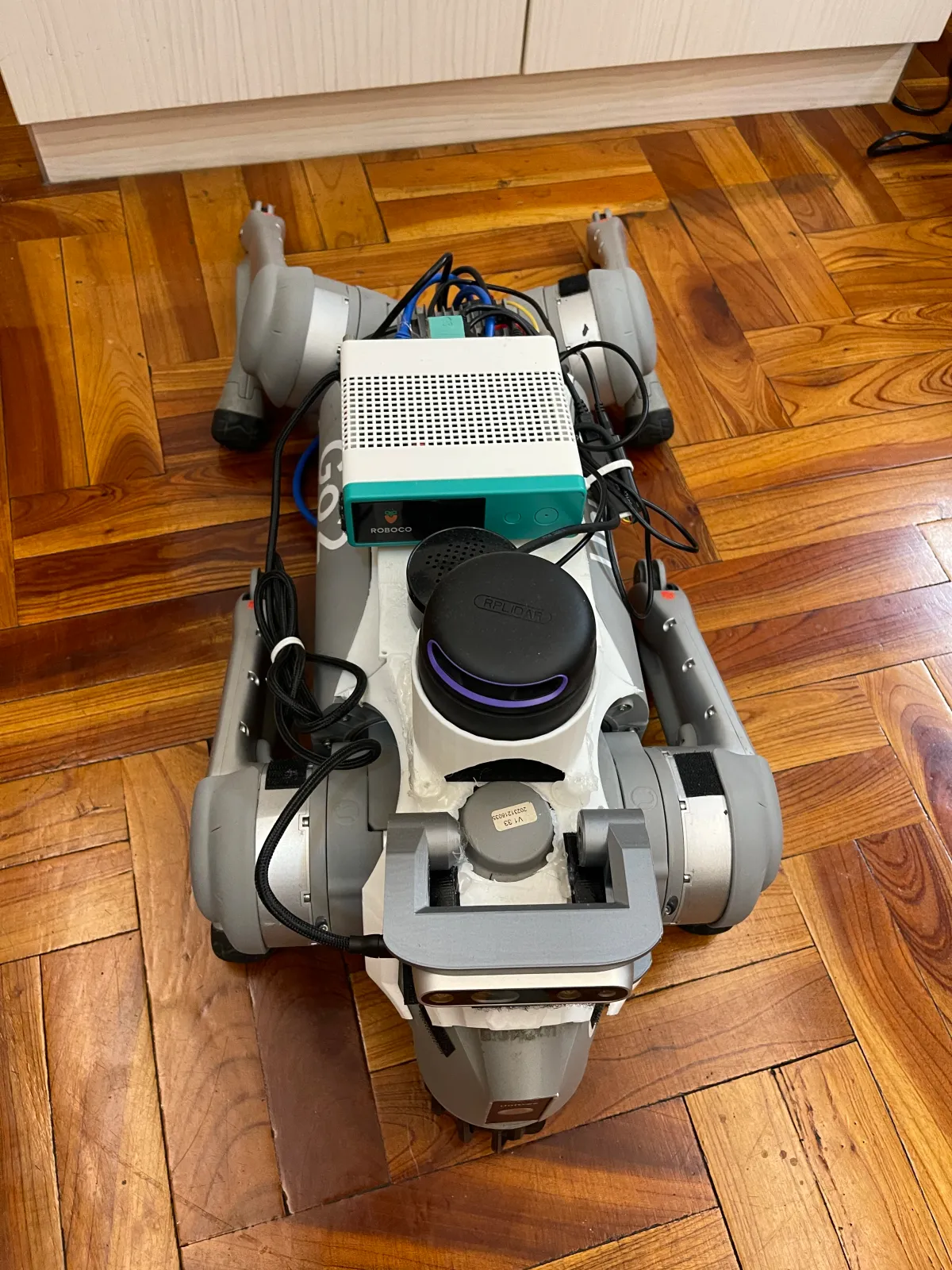
PawAI's back, seen from above.
Power: three converters
This was the most painful part of the hardware. The Go2 battery sits around 28.8 V and reaches 33.6 V when full; the Jetson needs 9 to 20 V. So a converter has to bring twenty-something volts down to about 19 V. The hard part is doing that reliably on a dog that walks.



Product listing images of the three converters (source: Shopee listings).
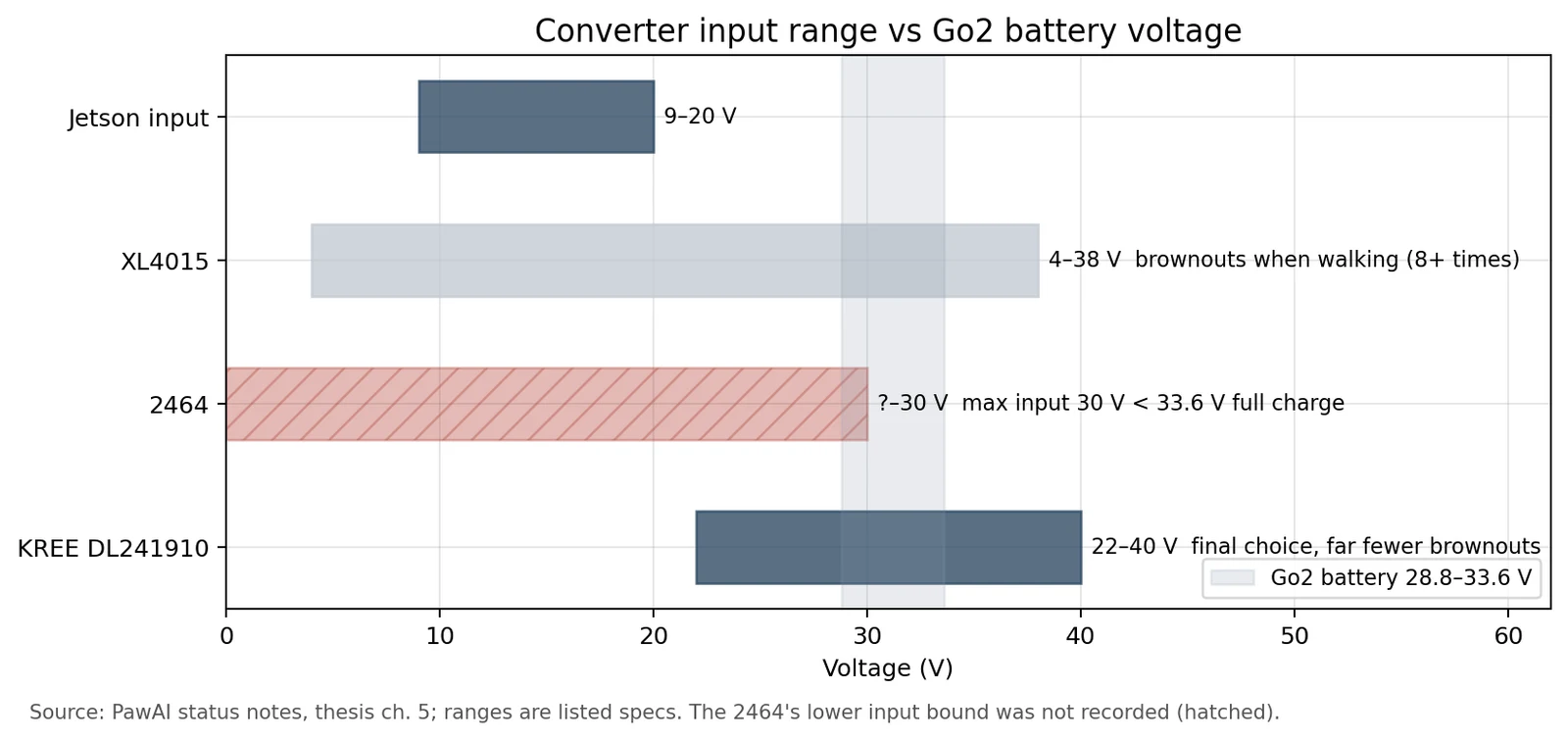
- XL4015: the common, cheap module I started with, set to 19 V. Standing still was fine; once the dog walked or many recognition features ran at once, the Jetson browned out and rebooted, eight times or more in total. It normally drew about 10 W but peaked around 3 A. Raising the output from 18.8 V to 19.2 V helped for a while, but it still could not keep up, and the module ran hot.
- 2464: a module with digitally set voltage and constant-voltage/current protection. The first night it did not brown out at all. But its maximum input is only 30 V, while a fully charged Go2 battery is 33.6 V. It was not “the same problem, worse”; it was a different failure.
- KREE: the aluminum converter I settled on accepts 22 to 40 V and outputs a fixed 19 V at up to 10 A (190 W). Its input range covers the Go2 from low battery to full, and the aluminum case is its heatsink. After switching, brownouts dropped sharply.
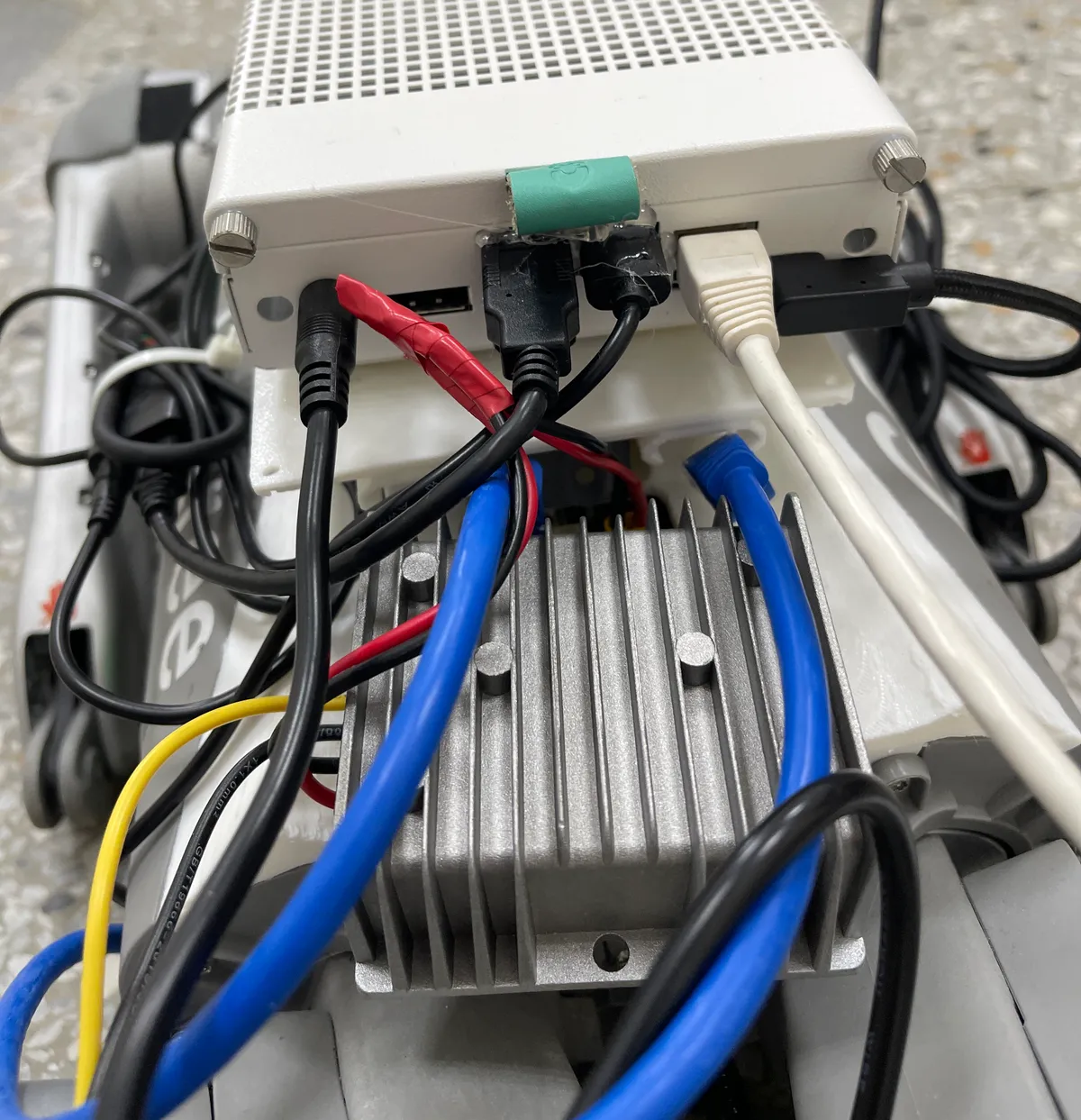
Photo: the KREE converter on the Go2's back, under the Jetson box.
The lesson: choosing a converter is not just “how many volts out”. Check whether the input range covers the battery from empty to full, whether peak current will drag the voltage down, and whether a small module will overheat on a dog’s back.
Compute: I blamed memory, but it was the CPU
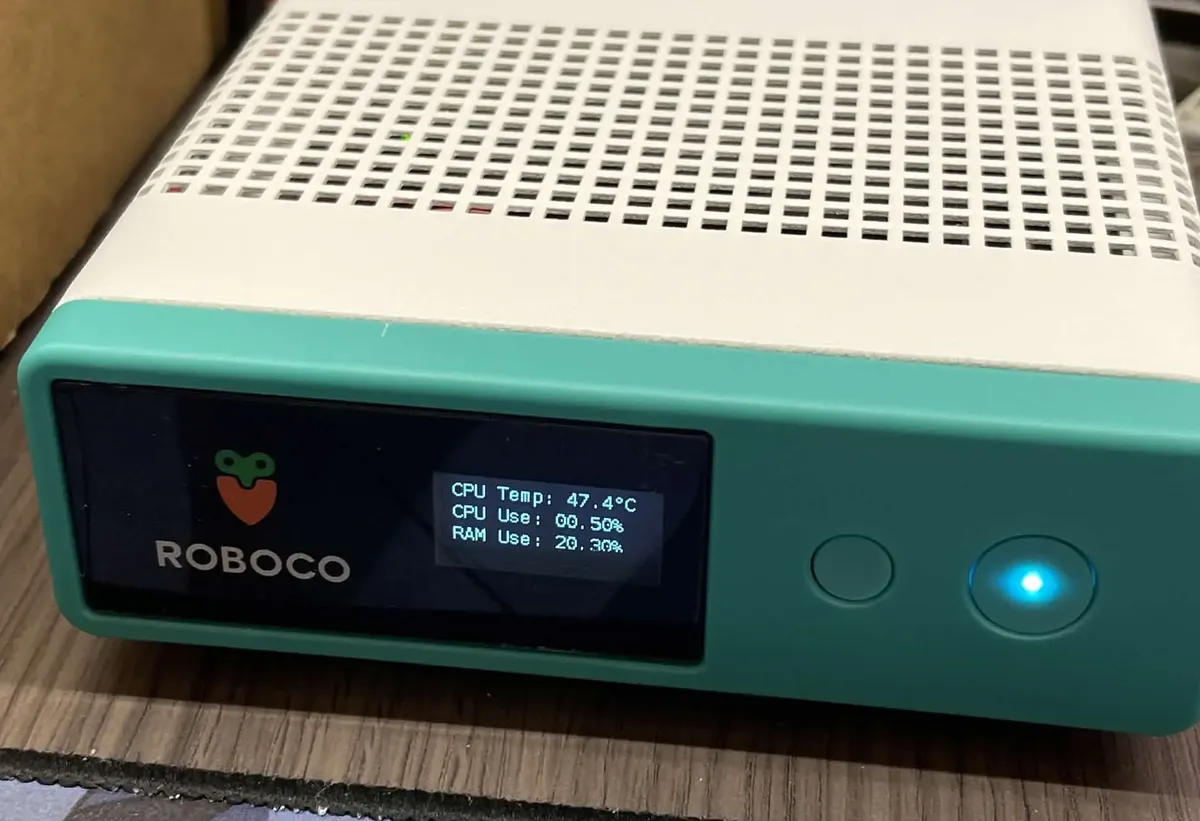
PawAI's brain: the Jetson Orin Nano, its small front screen showing live temperature and usage.
The Jetson Orin Nano has only 8 GB of memory, shared by the CPU and GPU. Before mounting anything, I ran each candidate model alone to see its speed and GPU use, then decided who got the GPU:
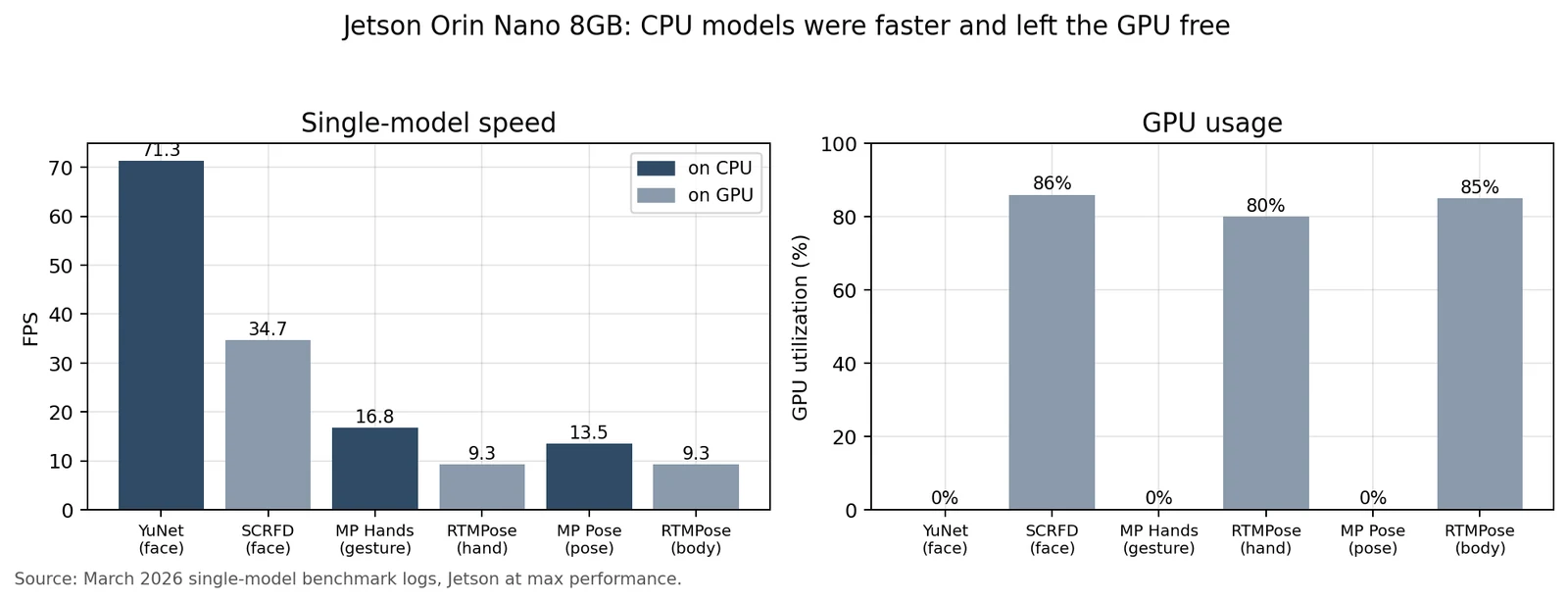
The CPU face model was twice as fast as the GPU one and used no GPU at all, while the GPU gesture and pose models ran at about 9 FPS yet took over 80% of the GPU. So only object detection (YOLO26n with TensorRT, about 15 FPS) got the GPU; face, gesture and pose all ran CPU versions.
At the time I thought memory was the big wall: my thesis estimated 4.0 to 5.5 GB for the interaction modules alone and 5.5 to 6.7 GB with navigation, right up against the limit. While writing this post I powered the dog back up and measured each setup with tegrastats for 60 seconds:
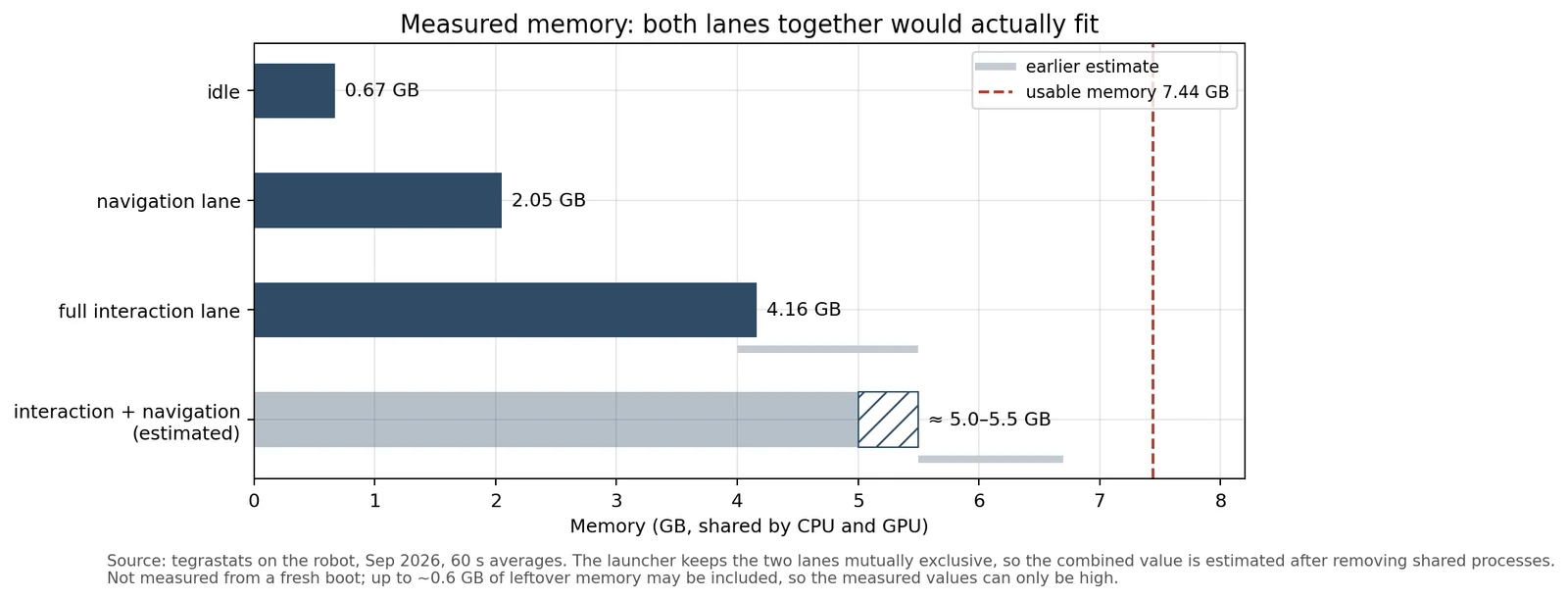
The measurement overturned the old conclusion. The full interaction lane (Go2 driver, perception, speech, the brain and the Studio gateway) used about 4.16 GB, and the navigation lane about 2.05 GB. Removing the driver and camera that both share, the two together come to an estimated 5.0 to 5.5 GB, still inside the 7.44 GB that is actually usable.
What was really tight was the CPU. Measured the same day, with the dog standing still and no conversation going on:
| Full interaction lane | Navigation lane | |
|---|---|---|
| Average CPU use | 82% | 63% |
| Jetson board power (4.6 W idle) | 10.2 W | 6.7 W |
| D435 color frame rate, actual | about 7 fps (set to 15) | about 24 fps (default profile) |
| Longest gap between odometry messages | 0.74 s | 0.12 s |
The interaction lane alone kept the CPU at 80%, cut the camera to half its configured rate and occasionally stalled odometry for more than half a second. Navigation depends on steady odometry and lidar, so my guess is that stacking it on top would break the CPU first, not the memory. In practice the two systems ended up as two mutually exclusive launch modes, and the capstone demo was split into two parts; they never actually ran together, which is why the combined row can only be an estimate.
Local small language models and speech recognition were not good enough either, so both moved to a remote GPU.
One more episode: I once installed the object-detection package the usual way, and it overwrote the Jetson-specific PyTorch and NumPy, breaking the whole environment for half a day. After that, models ran on ONNX Runtime with TensorRT, and the system packages stayed untouched. Temperature was better than I feared: about 56 °C at most after 30 minutes of continuous running.
Mechanics: every part comes loose
- Speaker: the USB speaker started out just sitting on the dog’s back; once the dog walked, vibration broke the connection. Hot glue and zip ties finally held it.
- Lidar mount: the lidar was first attached with Velcro and wobbled as the dog walked, so maps grew larger and doubled. A reprinted mount fixed it, at the cost of recalibrating the software’s coordinates every time the position or orientation changed.
- Depth camera angle: it had to look up at faces and down at obstacles at its feet. Tilt it up and low obstacles are only caught when very close; tilt it down and it cannot see a standing person’s face.
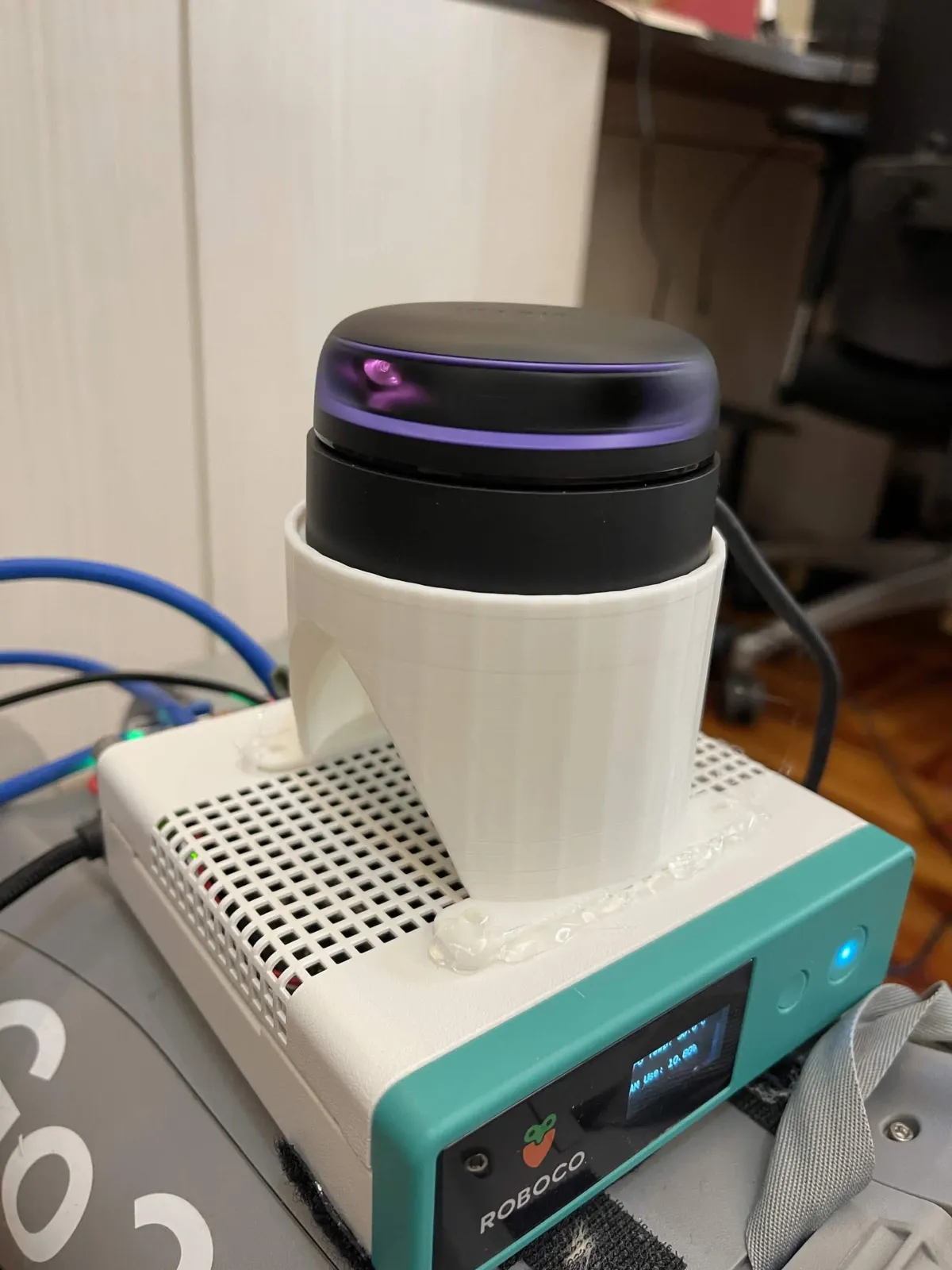
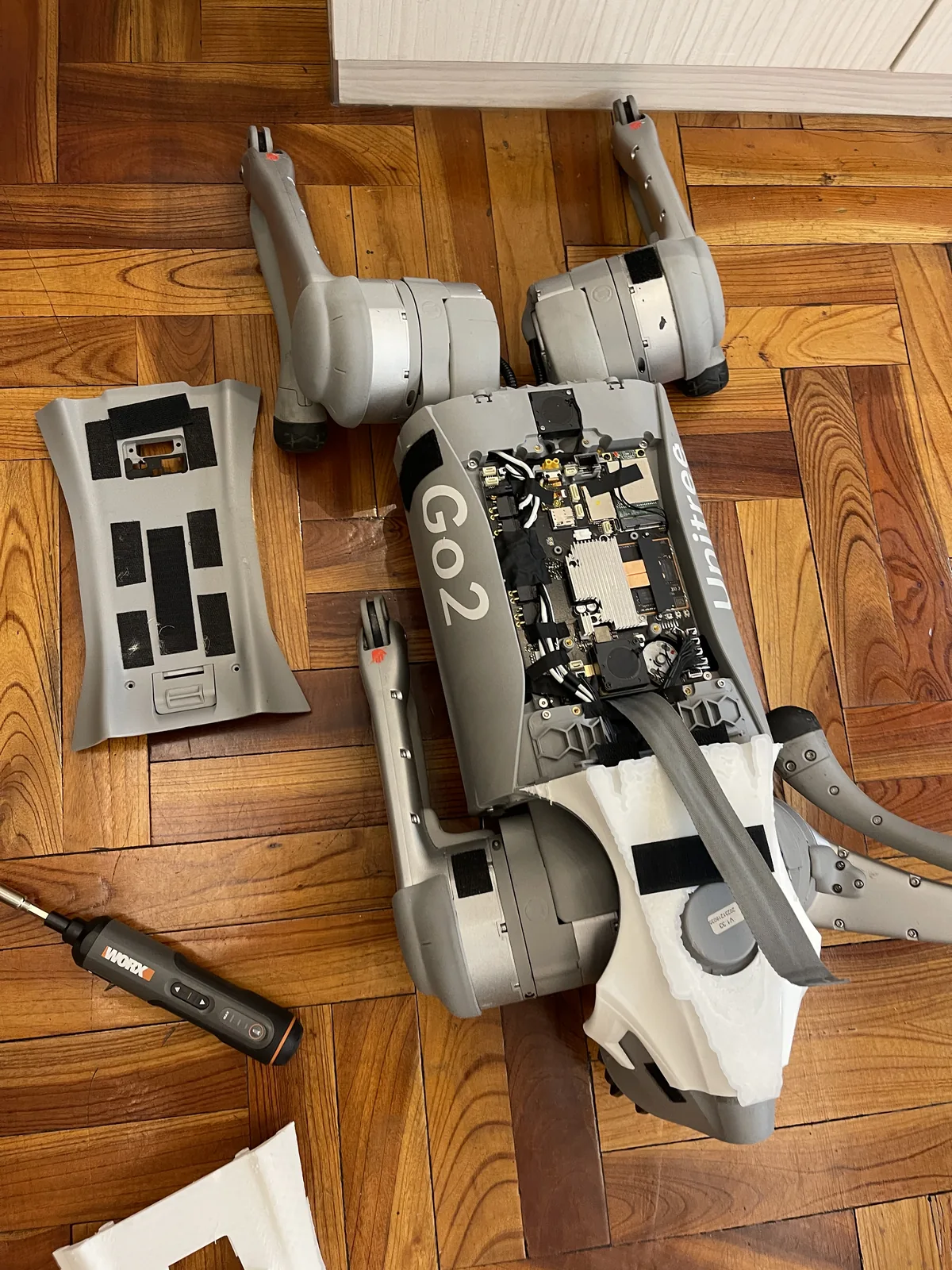
Left: the 3D-printed lidar mount above the Jetson box. Right: April, with compute, sensors and power mounted.
Network: wired, and offline
The Jetson first talked to the Go2 over the Go2’s built-in Wi-Fi hotspot with about 700 ms of latency: obstacle data was stale by the time it arrived, and the dog once bumped into a wall because of it. A direct Ethernet cable brought latency under 1 ms. The Go2 may also update its firmware automatically when online, which can change how its control interface behaves, so on demo days it never connected to the internet.
Sensors: in view is not the same as seen
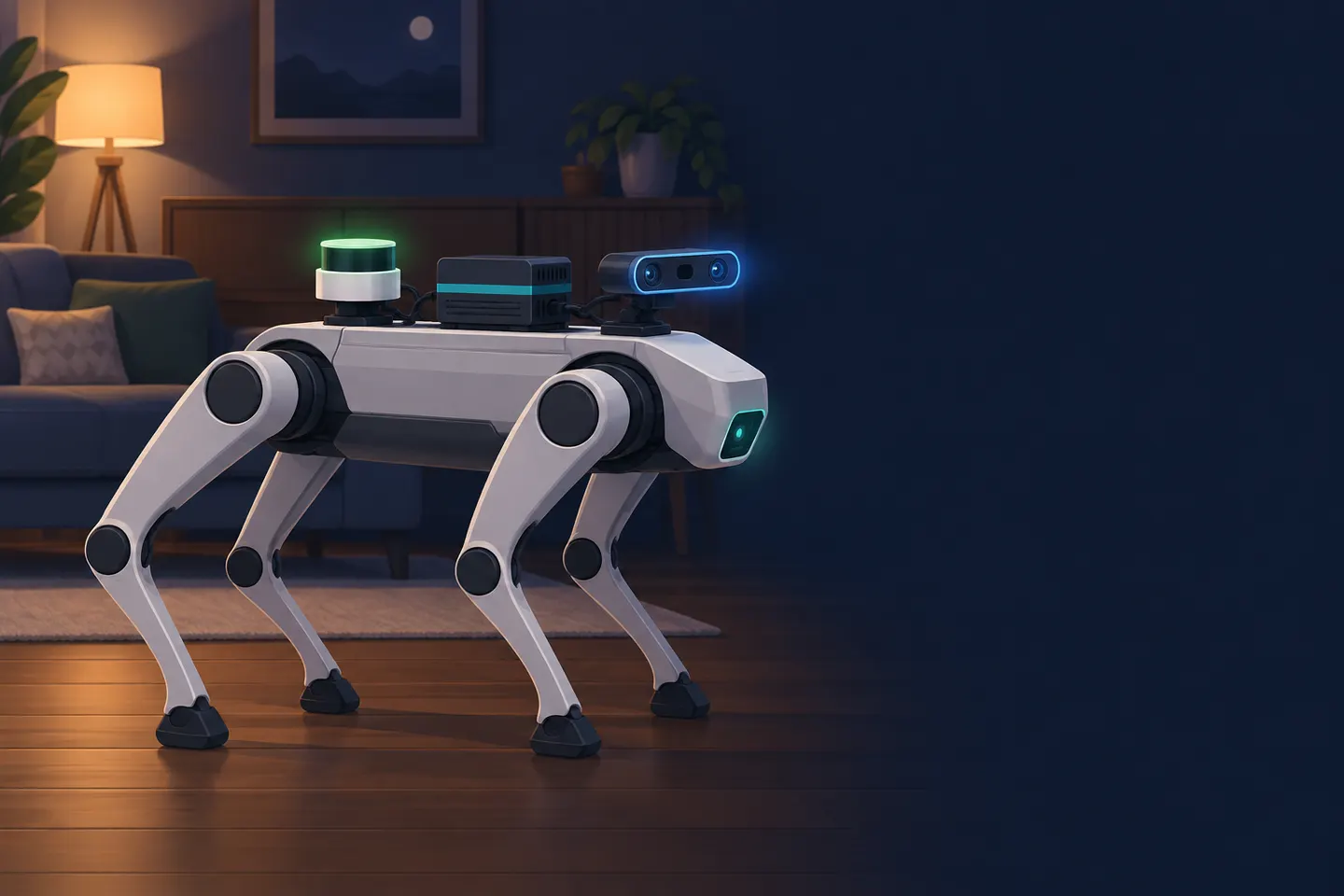
What each of the three sensors can't see, in one minute. The images in the animation are AI-generated (Codex); the numbers come from measured test records.
Before PawAI, I thought obstacle avoidance was a software problem: sensors see, algorithms decide. Eight months later, I think most problems are decided at the layer of what the sensors can actually see.
Depth camera (Intel RealSense D435)
Angled up for faces, the camera sees low obstacles only at the bottom edge of the frame. At the time, “is there an obstacle ahead?” was decided from the depth in a central region, so low objects were caught only within about 0.4 m; add stopping time, and all three early collision tests hit.
In a later retest I measured it more precisely: a 20 cm box at 0.5 m—
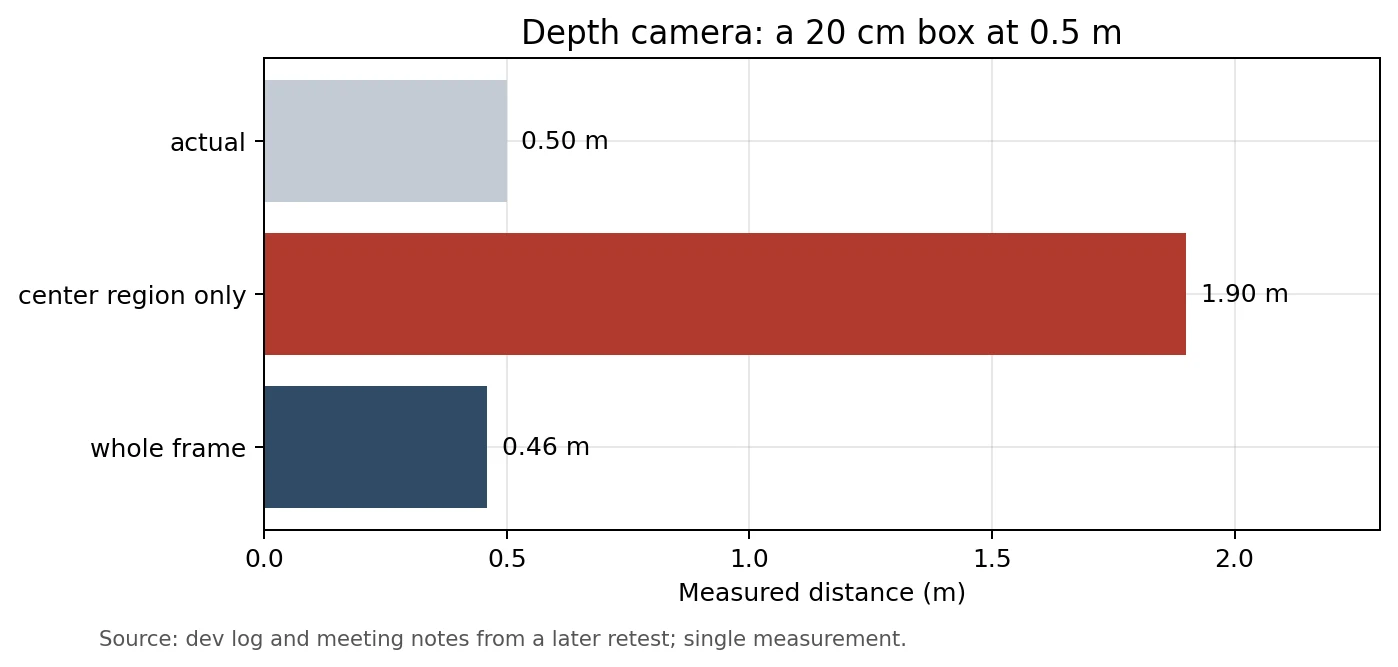
With only the center, it read the wall behind the box, as if the box were not there; searching the whole frame for the nearest point gave 0.46 m.
There was also an architectural problem: the camera only published a “path clear or not” signal and never sent a stop command itself. In one crash, the dog was driven through a separate path that sent motion commands directly and never went through that check. A sensor seeing something does not mean the information reaches whatever controls the dog.
2D lidar (RPLIDAR A2)
A 2D lidar scans a single horizontal plane. On the dog, that plane sat a little over 0.5 m off the floor, so low boxes, thin table legs, low table edges and black objects were almost invisible. A walking quadruped also sways, which in theory tilts the scan plane; I only have reasoning for that, never a recording of body tilt and lidar data together while walking, and it is the measurement I most need to add.
The lidar’s orientation on the dog (its extrinsics) went through several versions. Get it wrong, and the map comes out rotated or mirrored:
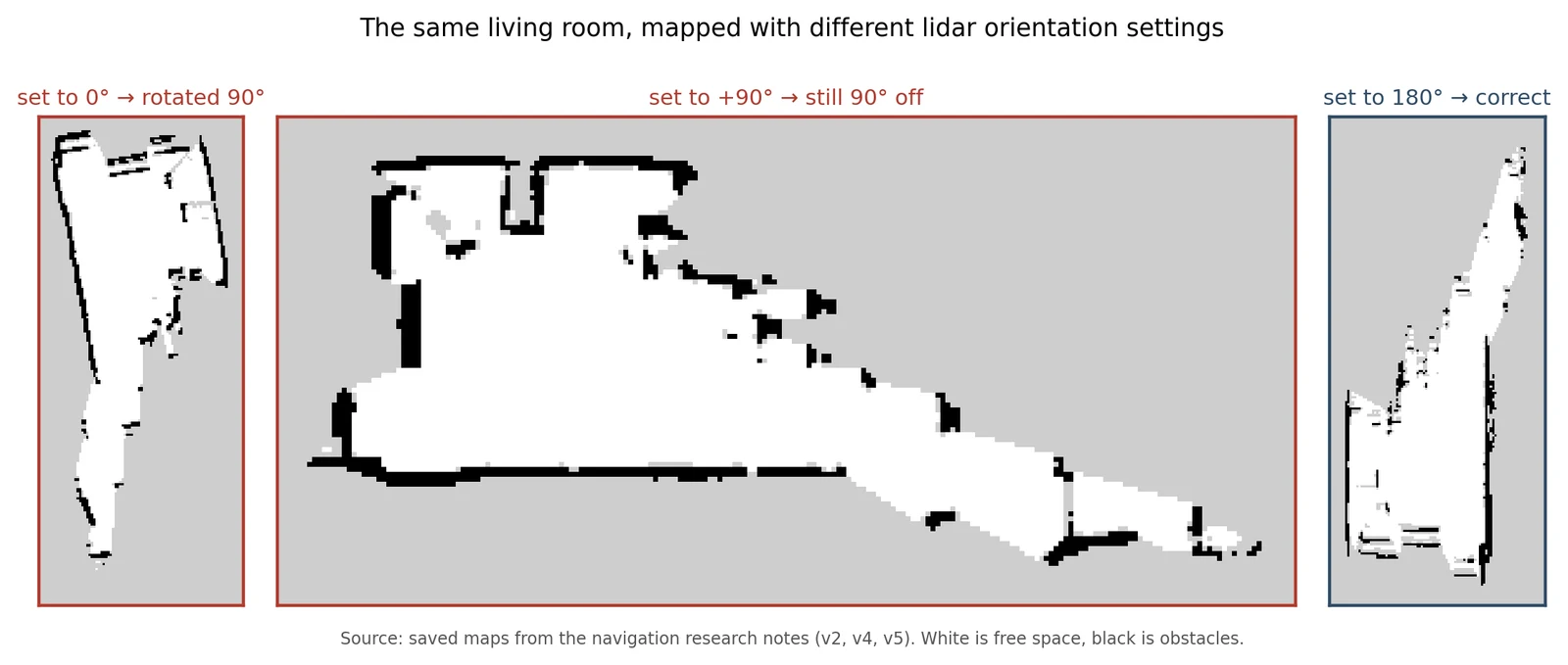
The same living room mapped with different orientation settings. In late April I tried four orientations in one day and threw the first maps away; later I doubted it by 180 degrees and flipped it again, and only a real-robot check settled it.
Worst of all, a wrong orientation often produced a map that “looked reasonable”:
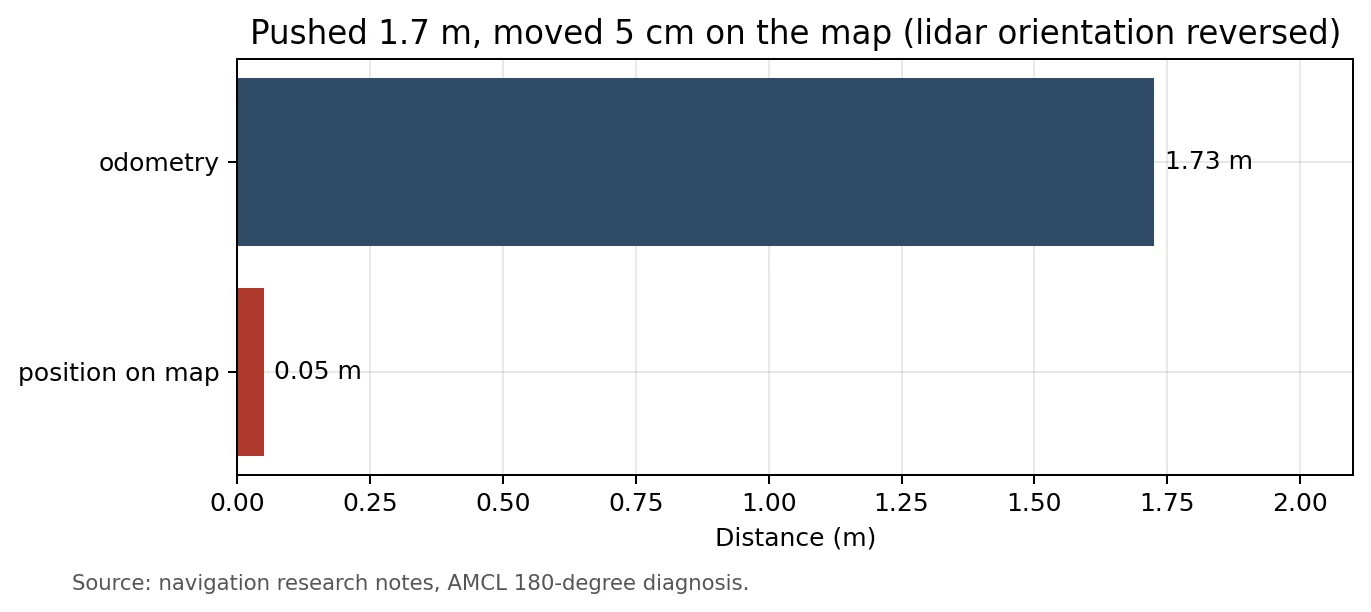
Another time the lidar kept timing out and I assumed the hardware had failed. It was overturned the same day: the launch command was missing an argument, so the baud rate was never applied. With the correct command, the external A2 held steady at 10.57 to 12 Hz.
The Go2’s built-in 4D lidar
The Go2 has a 4D lidar in its head, but the Go2 Pro does not expose a full data interface; all I could get was a compressed packet over WebRTC. Its update rate started at 0.03 Hz, while mapping needs at least 5 Hz:
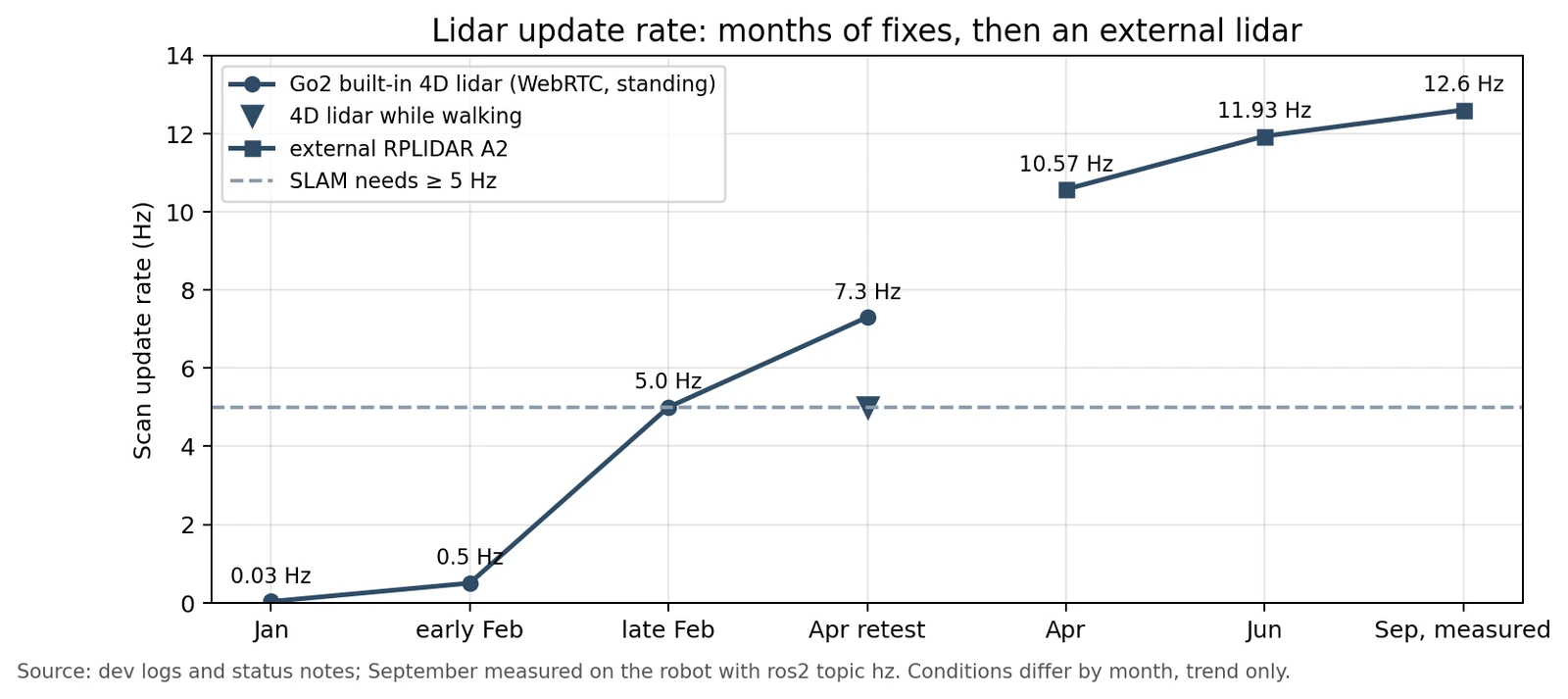
When I finally unpacked that packet, 77,824 bytes times 8 was exactly 128 × 128 × 38 cells: not a point cloud but a 3D occupancy grid, with each cell about 5 cm across marking whether that bit of space is occupied. Rewriting the decoder to process the whole bit array at once cut decoding from hundreds of milliseconds to about 6.6 ms.
The real problem showed up in a retest:
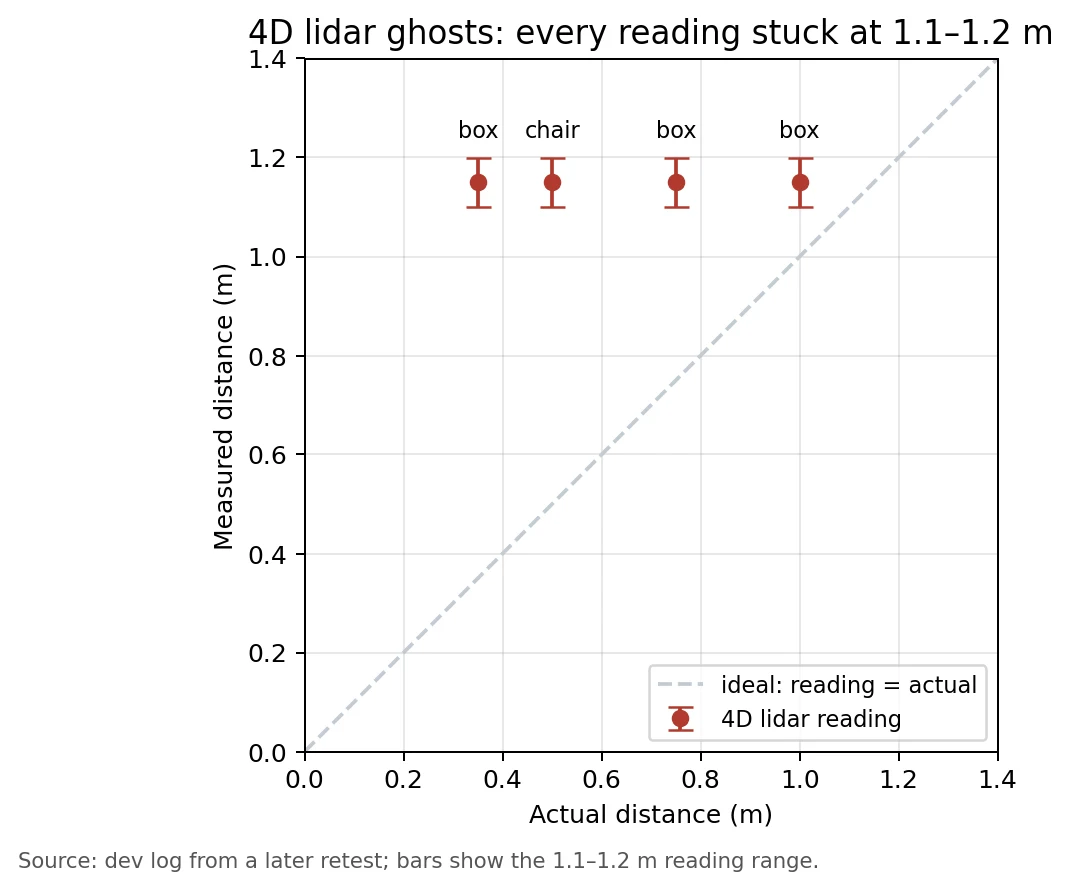
However close the box was, the reading stuck at 1.1 to 1.2 m; in an empty room, 99.4% of the points were stale. Further checks showed the behavior depends on height: objects more than 0.3 m off the floor appear within 1 to 3 seconds and clear 2 to 6 seconds after removal; anything below 0.3 m only accumulates and never clears; moving people barely enter the map at all. So the Unitree app can look perfectly normal while the data my code receives has ghosts. Both are true.
I also suspected the IMU or odometry: the grid’s origin follows odometry, so odometry drift could make old cells look like ghosts. But I found no direct evidence that the IMU was involved; that remains a hypothesis. My conclusion: the 4D lidar can supplement high obstacles, but it cannot replace the 2D lidar.
What the three sensors taught me
- Blind spots: every sensor has heights and distances it cannot see, and low objects fall exactly where all of them overlap.
- Coordinates: if a sensor’s position or orientation is slightly wrong, every downstream decision is wrong too, and wrong in a plausible way.
- Wiring: seeing something does not mean it reaches the path that controls the dog.
What I would change: a fixed measurement routine for every sensor (fixed distances, fixed-size objects); extrinsic calibration as a formal step instead of judging whether the map “looks right”; the depth camera for close and low objects, the 2D lidar for mapping and mid range, the 4D lidar for high obstacles, with the avoidance decision reading all three and wired straight into whatever sends the stop command. Longer term, a multi-line 3D lidar would suit a quadruped better.
Navigation: most collisions were not about seeing
Going back through every navigation failure, what surprised me most was that most collisions were not because “the algorithm did not see the obstacle”, but because of timing and control.
The physics of stopping
Even when it saw an obstacle, the dog could not stop on the spot:
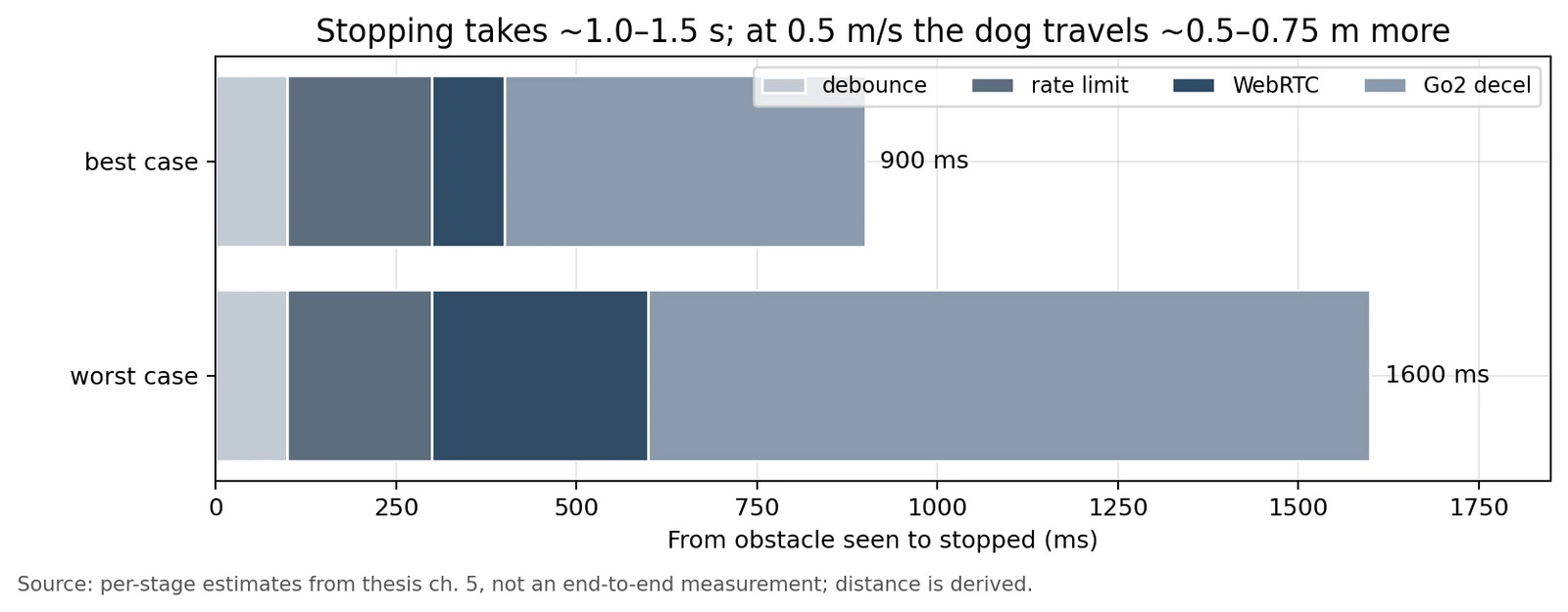
The Go2’s move command bottoms out around 0.5 m/s, and it takes more than a second from seeing an obstacle to actually stopping. In a 0.9 m aisle, that margin barely exists. It took a wall collision before I raised the danger distance from 0.6 m to 1.1 m.
Control: who is driving the dog
- The stop node was looking backward: the code meant to “stop if something is ahead” was actually watching behind the dog, so it hit a box 30 cm away.
- An old command took control again: once the stop logic decided the path was clear, it stopped publishing; about half a second later an old forward command took over and the dog lunged.
- Without a new command, the Go2 keeps the last one: tested alone, the dog stopped 30 cm before the obstacle; in the full system it hit it. The command multiplexer only published when it received input, so when input stopped, the Go2 kept executing the last “go forward”.
- The wrong rescue command made the dog fall: while the dog was swaying badly during an avoidance run, I tried to stop it and sent the command that releases the motors instead; the Go2 collapsed.
- All green, then a crash on step one: the scene at the start. The static checks verified position error but not heading, and a slightly wrong initial heading sent it off course on the first step.
What these share: every module was correct when tested alone and only failed when connected, and every error message looked plausible, so finding the real cause took a long time.
Voice and interaction: the dog is loud and events collide
The mic was drowned out by the fan
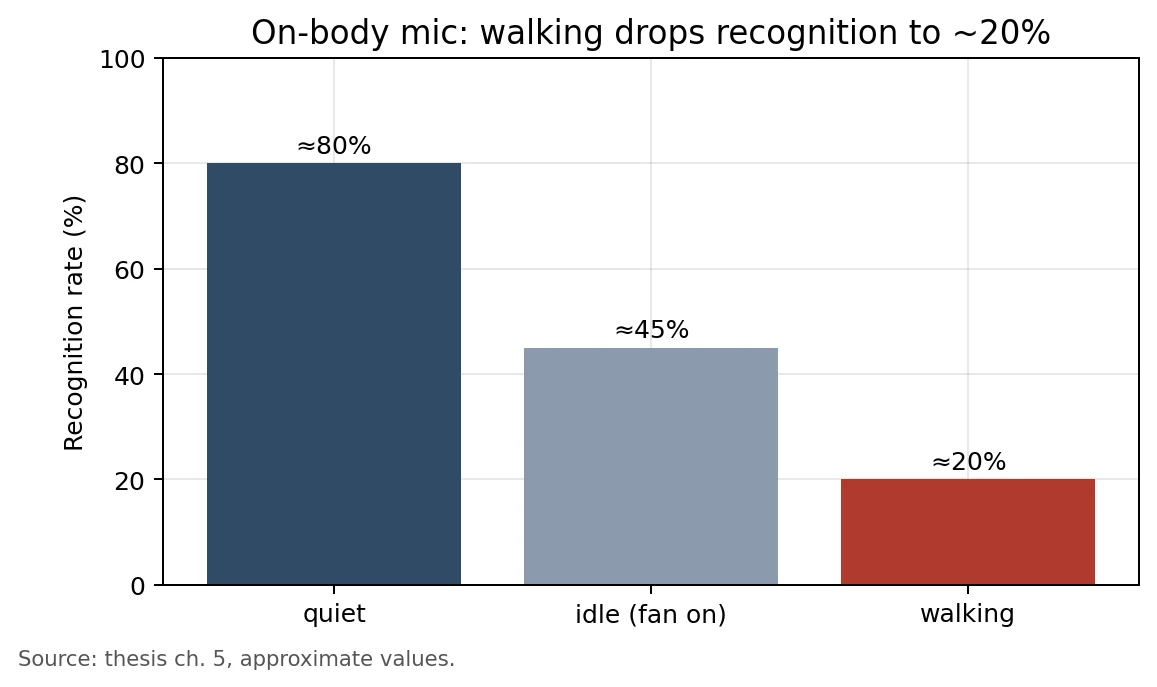
The on-body microphone was buried under the Jetson fan and walking noise; once the dog walked, it understood about two sentences in ten. Raising the mic gain made it worse. In the end we recorded with a laptop, and “stop”, which must never fail, became a gesture.
Changing models: Whisper at 52%
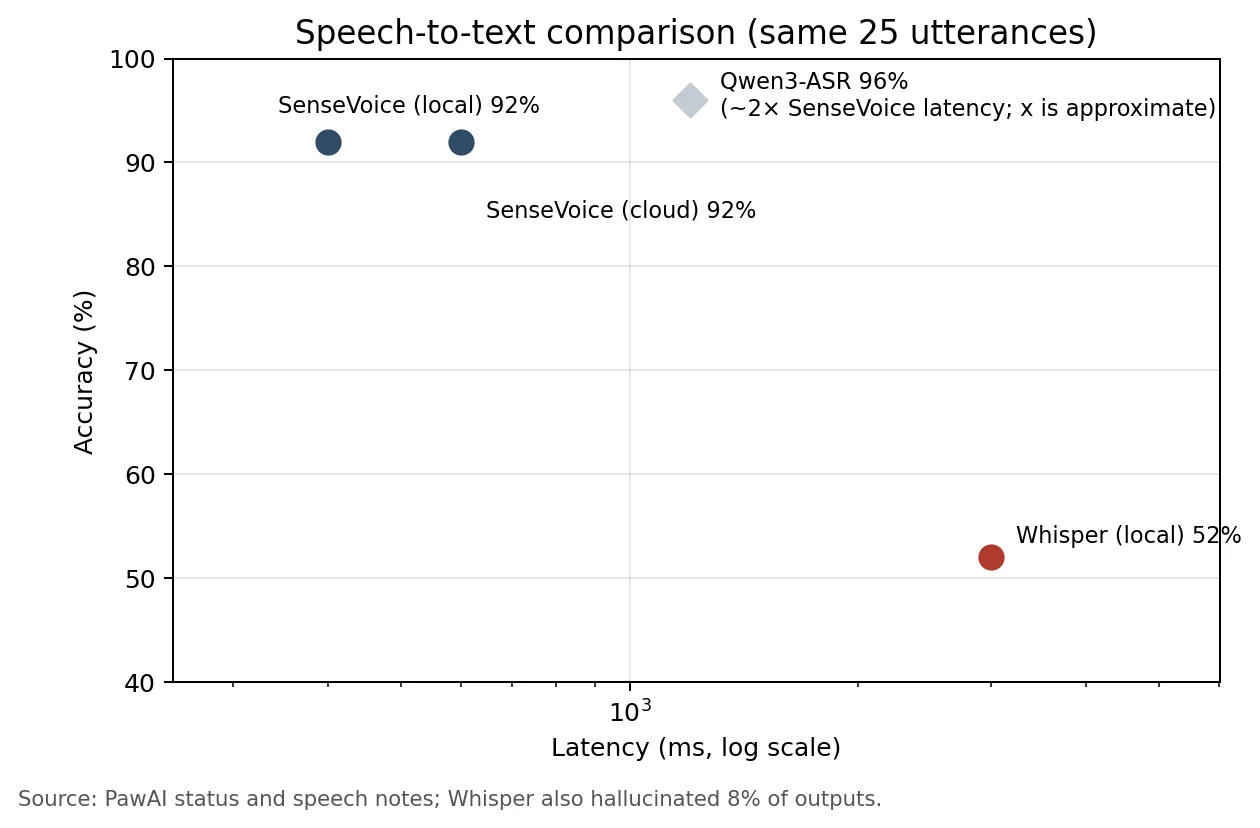
The Whisper model we started with got 52% on the same 25 utterances and sometimes invented captions. SenseVoice reached 92% with a few hundred milliseconds of latency.
How long after you finish speaking
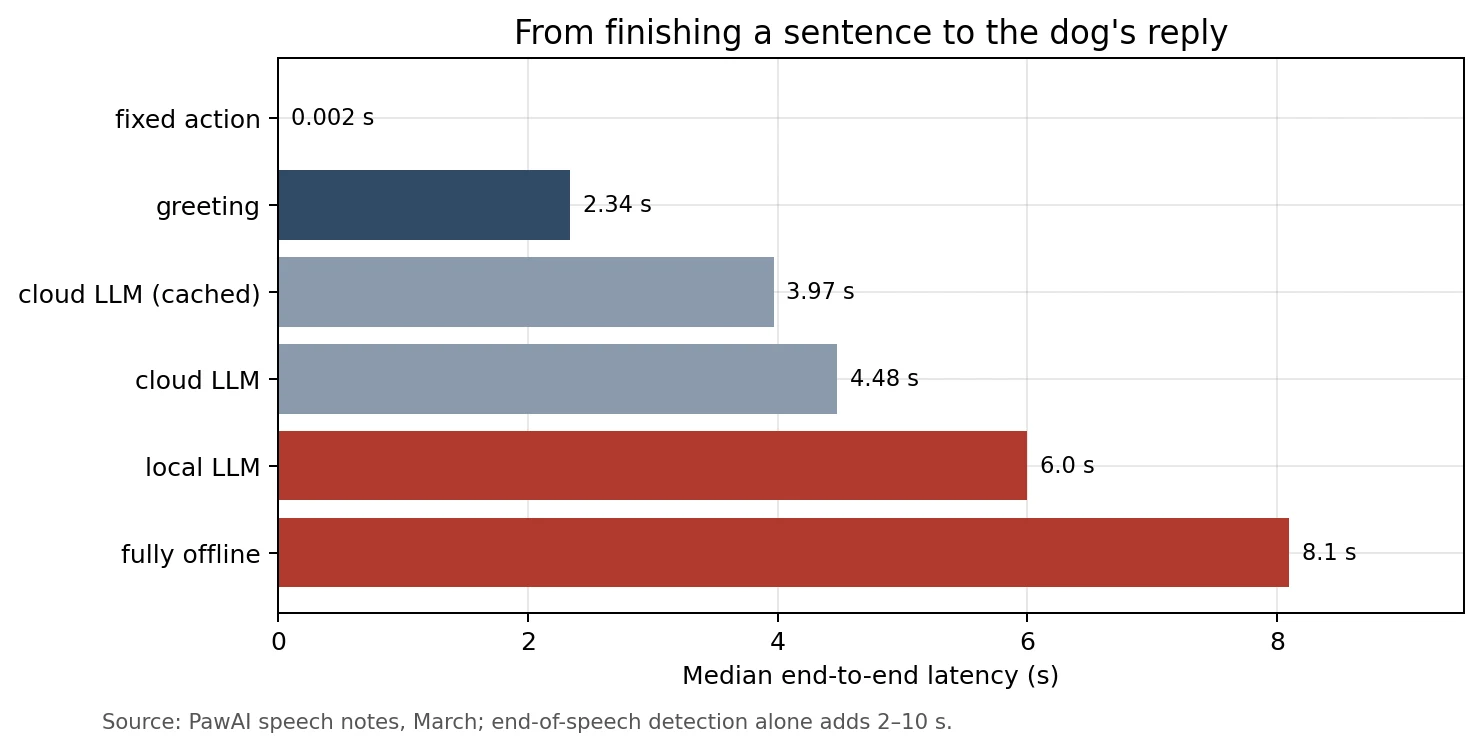
The biggest bottleneck was not the model but deciding whether you had finished speaking: end-of-speech detection alone took 2 to 10 seconds. After several rounds of work, end-to-end latency dropped from 5.7–14.5 s in March to roughly 5–8 s in May.
Giving the dog a voice: Gemini TTS with two fallbacks
For the dog’s replies I used Gemini Flash TTS with the Despina voice (the same voice that narrates the animations on this site). Because it runs in the cloud, I gave it two fallbacks: if Gemini fails, edge-tts takes over, and if that fails too, Piper runs fully offline.
I tested this on purpose with a wrong API key: when Gemini failed, edge-tts took over automatically and finished the sentence. Since edge-tts held up, the last layer, Piper, never got used in that run, so it still hasn’t been verified on the robot.
Gemini TTS had its own pitfalls:
- Silence at both ends of every chunk: each audio chunk came with roughly 80 to 200 ms of silence at the start and end. I wrote a separate module to trim it.
- Long replies “skipped”: longer replies were split into several chunks synthesized in parallel, and the same voice came back louder with each chunk (measured loudness went from 782 to 1139 to 1529), so it sounded like it kept getting louder and then suddenly dropped.
Other traps
- Longer stories always cut off at 30 characters: I spent five hours on it and finally found the Jetson was running an old build; the fix had never been deployed.
- The dog’s speaker had to be reverse-engineered: the Go2’s built-in speaker only accepts a specific format with undocumented limits; it took about two weeks to get stable audio, after which it passed 20 times in a row.
- Events fought and the dog said nothing: seeing a face, a cup and a gesture at the same moment, the events competed to speak and none got through.
- The LLM made things up: saying it was raining outside, or that it saw a cup, when neither was true.
Lots of tests, not much reliability
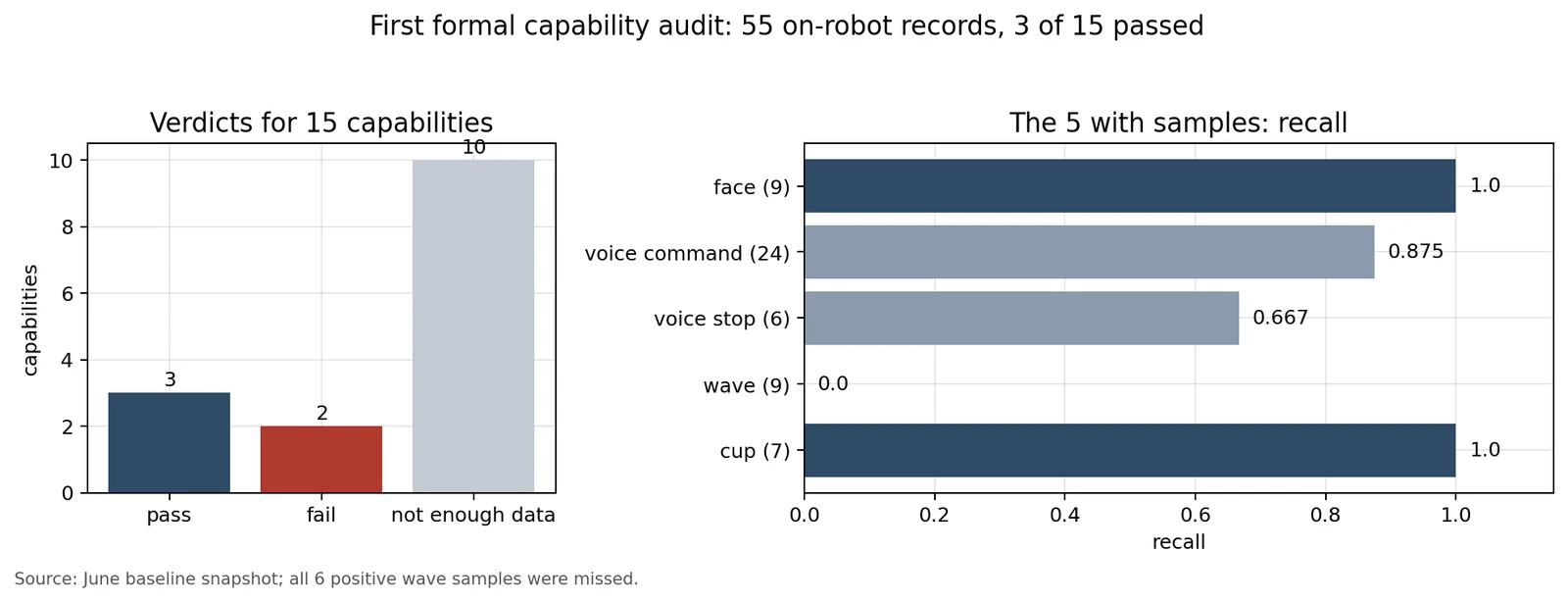
In June I ran the first formal capability audit, scoring 15 capabilities with 55 raw records from the real robot. Three passed, two failed, and ten did not even have enough samples. All six positive wave samples failed, and “stop” missed two of six. Only then did I really accept that “implemented” and “measured and working” are different things.
Some kinds of false passes kept coming back:
- A test script did not stop on failure, so it reported all green while some items were skipped.
- A config file had the wrong line endings; the demo flow reported success while the service never started.
- Several real-robot runs were not running the latest code: a parameter changed without a rebuild, an install directory not updated, a fix never deployed to the Jetson. Every time I thought I was testing the new version.
- On one day, 8 PRs were merged and about 955 tests had accumulated, and the same day navigation was still judged not ready to show.

AI-generated illustration (Codex): the same scenario should move up layer by layer, from unit tests, replay, simulation and stationary integration tests to a speed-limited, short real-robot run.
AI wrote more; why didn’t the dog get more reliable?
For these eight months I built alongside AI coding agents. Specs, code, tests and review reports grew at an astonishing pace, but the dog did not become more reliable. Looking back, there were roughly three reasons:
First, real-robot validation did not get faster. AI can write a thousand lines and dozens of tests in a day, but there was one dog, one battery, one room and one operator. The faster code came out, the higher the pile waiting for real-robot validation grew.
Second, three timescales were packed into one acceptance ticket. I wanted near-term reliable movement, a mid-term complete product and a long-term extensible architecture, all in the same month, the same demo and the same acceptance criteria. Each got a little progress and none converged.
Third, the AI’s first explanation was often wrong but sounded complete. After the wall collision, the first analysis blamed navigation’s view distance; checking the logs myself, I found navigation was not even in control of the dog at the time. “The lidar hardware is broken” was also overturned later: the launch command was missing one argument. AI is very good at weaving the available evidence into a plausible story, but only the real robot and raw data can tell you whether the story is true.
Another lesson was about safety. To avoid danger I added layer after layer of safety checks, and every integration uncertainty ended up as “the safety check won’t let it move”. The system got better and better at explaining why it could not move, and never actually moved safely.
The real problem: many capabilities, no scenario

AI-generated illustration (Codex): able to do a bit of everything, without knowing what it is for.
Laying all these difficulties out, I think the root problem was not any one sensor or piece of code. It was this: we integrated many multimodal capabilities on one dog without a concrete use case, and without a single feature someone could actually use.
The evidence was there all along:
- Questioned on positioning at review: a reviewer asked, “Is this a dog, a robot or an assistant?” Another challenged, “Take the robot dog away. Couldn’t a phone do this?”
- Separate features, no product: face, voice, gesture, pose and object recognition each worked, but what a user would actually use it for was never clear.
- We could not test because we did not know what to test: 10 of 15 capabilities lacked data. Without a scenario, we did not know what “success” looked like, in what environment to test it, or how much testing was enough.
- Demos had to be split and backed up: movement and interaction could not run in one take, key segments needed pre-recorded video, and we kept a list of what we could and could not claim.
- Producing events is not the same as meeting a user’s need: the system could see a cup or a wave, but when a user would need it to react, and how, was never defined.
A reviewer also pointed out that on stage I kept talking about what we could not do, while the hardest and most valuable work, like the hardware modifications, the SDK and the three converters, was never mentioned. In a way, this post is making up for that.
If I did it again, I would reverse the order:
- Pick one concrete scenario first: who uses it, where, and what problem it solves.
- Work backward from the scenario to the capabilities it needs, instead of mounting every sensor and model first and then looking for a use.
- Define “success” for each capability: in what environment, at what distance, at what success rate it counts.
- Test in the real setting with the real flow: 0.3 m in a living room is not what a user will actually face.
On the hardware side, I would treat power and compute as real design work from day one: understand the battery’s voltage range and peak current, measure what the memory and CPU can actually carry at once, and only then choose features. And I would get the sensor mounts right once, instead of recalibrating and retesting every time a position changed.
Multimodal integration is not the goal on its own. It has to serve a scenario before it can be tested, improved and actually used. That is the most important thing PawAI taught me in eight months.
References
PawAI source code, hardware status notes, sensor test records and status documents.